Welcome to the part 2 of state design in Django. This time we’re going to connect what we have done in part 1 and adapt it to use it in a django model of a Sales Order.
The road so far
Alright, this is what we got so far. We created the state design with one class for each state (CancelState, ShoppingState, ClosingCartState, ProcessingPaymentState, ShippingState and DeliveredState). Other than that, we have a SalesOrderState class, which is the blueprint (Protocol) for all state classes and a Context for the SalesOrder model we are going to create.
You can check out the part 1 of the article in the link below:
https://alvernaz.dev/2024/05/16/state-design-in-django-part-1/: State Design in Django – Part 2Creating the model
Now that we’re all caught up, we’ll shift focus to the model side. We’ll start by creating the SalesOrder model and add the methods we included in the SalesOrderContext
One thing to note is that I stored the name of the state in the status field. I could change that to a 2 letter code for each state to avoid taking up space, but this will work for now.
from django.db import models
from apps.sales.sales_state import SalesOrderState

class SalesOrder(models.Model):
    """
    Sales Order model to represent a sale in our e-commerce app.
    """

    clientid = models.IntegerField(
        verbose_name="Cliente",
        null=False,
        blank=False,
    )
    status = models.CharField(
        verbose_name="Status",
        max_length=10,
    )

    def set_state(self, state: SalesOrderState):
        self.status = state.name

    def shop_for_items(self):
        ...
    def checkout_goods(self):
        ...
    def pay_for_things(self):
        ...
    def ship_the_goods(self):
        ...
    def stuff_delivered(self):
        ...
    def cancel_the_darn_thing(self):
        ...
In order to use the states appropriattely, we’ll need to map the value we set in status back to a SalesOrderState object. We’ll do that by adding a method to retrieve the SalesOrderState based on the name of the state stored in status in sales_state.py.
One other update I did was to the SalesOrderContext. Since we’re going to access the status field from the SalesOrder model in the new method, I included it in context as well.
class SalesOrderContext(Protocol):
    """
    Protocol that defines the required interface for sales order classes.
    """

    status: str

    def set_state(self, state: SalesOrderState):
        ...
    def shop_for_items(self):
        ...
    def checkout_goods(self):
        ...
    def pay_for_things(self):
        ...
    def ship_the_goods(self):
        ...
    def stuff_delivered(self):
        ...
    def cancel_the_darn_thing(self):
        ...

SALES_ORDER_STATE_MAPPING = {
    "Canceled": "CancelState",
    "Shopping": "ShoppingState",
    "Cart Closed": "ClosingCartState",
    "Processing Payment": "ProcessingPaymentState",
    "Shipping": "ShippingState",
    "Delivered": "DeliveredState",
}

def get_sales_order_state_object(sales_order: SalesOrderContext) -> SalesOrderState:
    """
    Retrieve an instance of the appropriate SalesOrderState subclass for a given sales order context based on its current status.
    """
    class_name = SALES_ORDER_STATE_MAPPING.get(sales_order.status)
    if class_name is None:
        raise ValueError(f"Unknown status: {sales_order.status}")
    state_class = globals().get(class_name)
    if state_class is None:
        raise ValueError(f"Class {class_name} not found")

    return state_class(sales_order)
So now we can call the method in our model and write down the methods that will call each state.
from django.db import models
from apps.sales import sales_state

class SalesOrder(models.Model):
    """
    Sales Order model to represent a sale in our e-commerce app.
    """

    client = models.IntegerField(
        verbose_name="Cliente",
        null=False,
        blank=False,
    )
    status = models.CharField(
        verbose_name="Status",
        max_length=20,
    )

    def set_state(self, state: sales_state.SalesOrderState):
        self.status = state.name
        self.save()

    def shop_for_items(self):
        current_state = sales_state.get_sales_order_state_object(sales_order=self)
        current_state.shop()

    def checkout_goods(self):
        current_state = sales_state.get_sales_order_state_object(sales_order=self)
        current_state.close_cart()

    def pay_for_things(self):
        current_state = sales_state.get_sales_order_state_object(sales_order=self)
        current_state.process_payment()

    def ship_the_goods(self):
        current_state = sales_state.get_sales_order_state_object(sales_order=self)
        current_state.wait_for_shipment()

    def stuff_delivered(self):
        current_state = sales_state.get_sales_order_state_object(sales_order=self)
        current_state.deliver()

    def cancel_the_darn_thing(self):
        current_state = sales_state.get_sales_order_state_object(sales_order=self)
        current_state.cancel_order()
You can probably see some issues out of the gate. We have some repetition going on, which doesn’t exactly follow the good old DRY (Don’t Repeat Yourself) methodology. There are several ways of doing this in a cleaner way, one of which will be addressed in the 3rd part of this series.
How is this working?
I believe here we can explain a bit what is happening, if you are not very familiar with State Design and knows a bit about Django. This logic would be applied when we want to connect the other Django objects like views, for example.
This is just one way that this could be implemented:
- The user clicks the Checkout button on his cart in our e-commerce page (i.e. a submit button in the template)
- The post method is called on the view in the backend.
- Validate form
- Get the SalesOrder model instance
- At this point, the model instance is in ShoppingState (name = “Shopping”)
- Still in the view called by the Checkout button, call the checkout_goods method on the SalesOrder model instance
- checkout_goods method calls the close_cart( ) method in the SalesOrderState object, which in this case will be an instance of ShoppingState class
- The ShoppingState instance will call the set_state method passing the new state as an argument
- The new status is saved
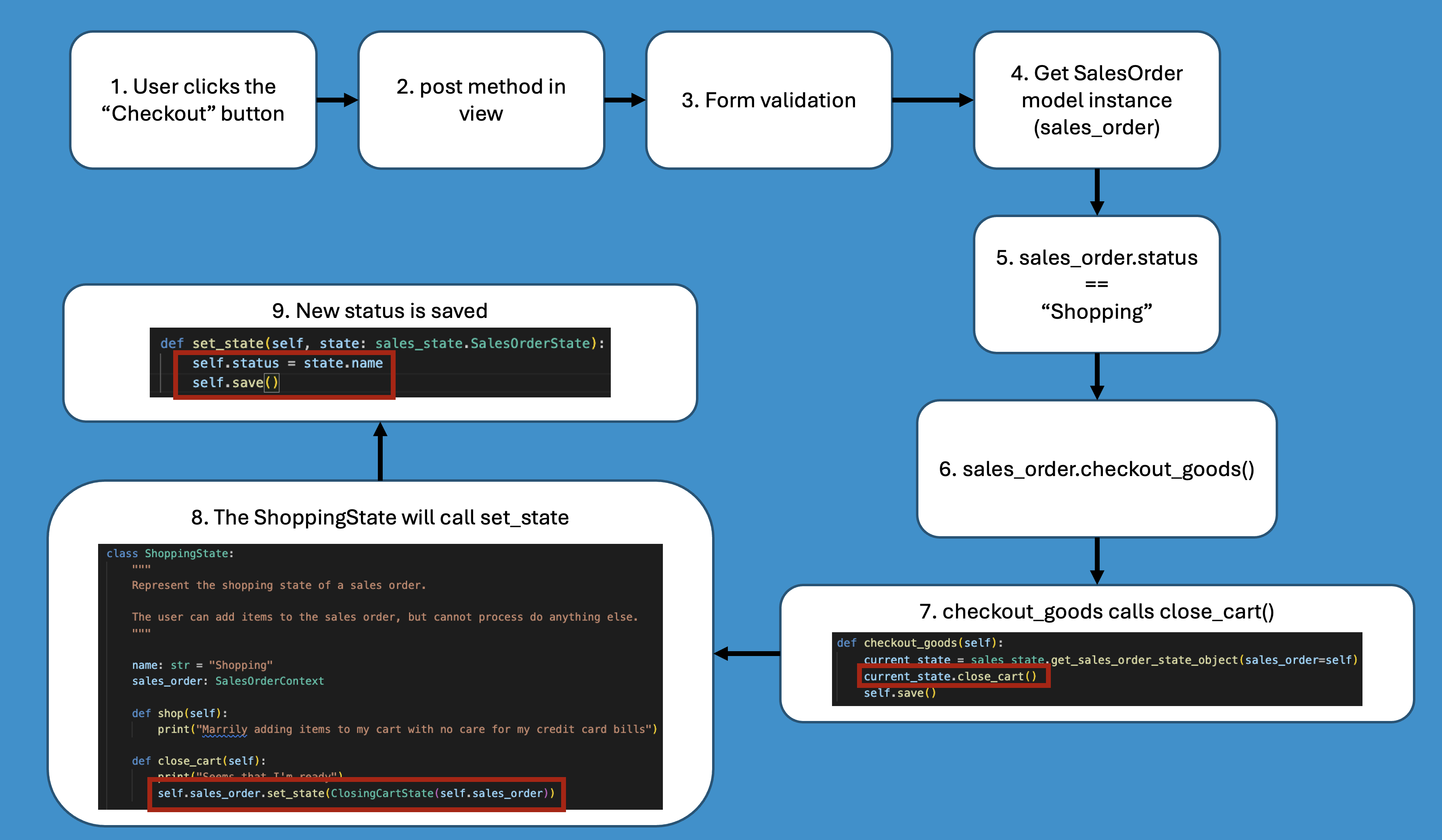
If this explanation doesn’t do the trick and gets confusing, let me know in the comments and I’ll adjust the article for better understanding.
Preventing weird behavior
Let’s face it, the world isn’t a perfect place and weird things can happen. For example, the user can click on the Checkout button and open the action on a new tab/window. Basically keeping the page with the Checkout button open while carrying on with the order in another tab.
Now let’s say the sales order is in ProcessingPaymentState. If we look at our code for ProcessingPaymentState, the only valid option to move the status to another state would be wait_for_shipment or cancel_order.
On the example above, we want to “break the system”, so we go back to the page with the checkout button we maintained open and click that button again. This is how it would go:
- The user clicks the Checkout button on his cart in our e-commerce page (i.e. a submit button in the template)
- The post method is called on the view in the backend.
- Validate form
- Get the SalesOrder model instance
- At this point, the model instance is in ProcessPaymentState (name = “Processing Payment”)
- Still in the view called by the Checkout button, call the checkout_goods method on the SalesOrder model instance
- checkout_goods method calls the close_cart( ) method in the SalesOrderState object, which in this case will be an instance of ProcessPaymentState class
- The ProcessPaymentState instance will only print out “But.. You already paid for it…”
- No changes are saved to the SalesOrder model instance

Final code
At the end of this article we have the following code for the sales_state.py:
from typing import Protocol

SALES_ORDER_STATE_MAPPING = {
    "Canceled": "CancelState",
    "Shopping": "ShoppingState",
    "Cart Closed": "ClosingCartState",
    "Processing Payment": "ProcessingPaymentState",
    "Shipping": "ShippingState",
    "Delivered": "DeliveredState",
}


class SalesOrderState(Protocol):
    """
    A protocol that defines the required interface for state classes handling sales orders.
    """

    name: str

    def shop(self):
        ...
    def close_cart(self):
        ...
    def process_payment(self):
        ...
    def wait_for_shipment(self):
        ...
    def deliver(self):
        ...
    def cancel_order(self):
        ...

class SalesOrderContext(Protocol):
    """
    Protocol that defines the required interface for sales order classes.
    """

    status: str

    def set_state(self, state: SalesOrderState):
        ...
    def shop_for_items(self):
        ...
    def checkout_goods(self):
        ...
    def pay_for_things(self):
        ...
    def ship_the_goods(self):
        ...
    def stuff_delivered(self):
        ...
    def cancel_the_darn_thing(self):
        ...

def get_sales_order_state_object(sales_order: SalesOrderContext) -> SalesOrderState:
    """
    Retrieve an instance of the appropriate SalesOrderState subclass for a given sales order context based on its current status.
    """
    class_name = SALES_ORDER_STATE_MAPPING.get(sales_order.status)
    if class_name is None:
        raise ValueError(f"Unknown status: {sales_order.status}")
    state_class = globals().get(class_name)
    if state_class is None:
        raise ValueError(f"Class {class_name} not found")

    return state_class(sales_order)

class CancelState:
    """
    Represent the cancel state of a sales order.

    The user is able to cancel the sales order and no other changes will be permitted.
    """

    name: str = "Canceled"
    sales_order: SalesOrderContext

    def shop(self):
        print("Order cancelled. Can't do that.")

    def close_cart(self):
        print("Order cancelled. Can't do that.")

    def process_payment(self):
        print("Order cancelled. Can't do that.")

    def wait_for_shipment(self):
        print("Order cancelled. Can't do that.")

    def deliver(self):
        print("Order cancelled. Can't do that.")

    def cancel_order(self):
        print("We're already there.")

class ShoppingState:
    """
    Represent the shopping state of a sales order.

    The user can add items to the sales order, but cannot process do anything else.
    """

    name: str = "Shopping"
    sales_order: SalesOrderContext

    def shop(self):
        print("Marrily adding items to my cart with no care for my credit card bills")

    def close_cart(self):
        print("Seems that I'm ready")
        self.sales_order.set_state(ClosingCartState(self.sales_order))

    def process_payment(self):
        print("Not until you close the cart.")

    def wait_for_shipment(self):
        print("Pay first, ship later")

    def deliver(self):
        print("Nope")

    def cancel_order(self):
        print("Abandon Shi... aaahmm... Cart?")
        self.sales_order.set_state(CancelState(self.sales_order))

class ClosingCartState:
    """
    Represent the closed cart state of a sales order.

    The user is able to re-open the cart to keep shopping, process payment and cancel the order, but nothing else.
    """

    name: str = "Cart Closed"
    sales_order: SalesOrderContext

    def shop(self):
        print("Forgot a few things eh? Happens to the best of us.")
        self.sales_order.set_state(ShoppingState(self.sales_order))

    def close_cart(self):
        print("It's closed! I swear it's closed!")

    def process_payment(self):
        print("How about we pay for the stuff?")
        self.sales_order.set_state(ProcessingPaymentState(self.sales_order))

    def wait_for_shipment(self):
        print("You gotta pay first, my friend.")

    def deliver(self):
        print("Not yet")

    def cancel_order(self):
        print("No goods for you")
        self.sales_order.set_state(CancelState(self.sales_order))

class ProcessingPaymentState:
    """
    Represent the process payment state of a sales order.

    The user can ship the order or can come back.
    """

    name: str = "Processing Payment"
    sales_order: SalesOrderContext

    def shop(self):
        print("Can't add things after you have paid.")

    def close_cart(self):
        print("But.. You already paid for it...")

    def process_payment(self):
        print("We just did that. If you have some extra cash, send it my way.")

    def wait_for_shipment(self):
        print("Let's get you your stuff.")
        self.sales_order.set_state(ShippingState(self.sales_order))

    def deliver(self):
        print("Nope")

    def cancel_order(self):
        print("No goods for you")
        self.sales_order.set_state(CancelState(self.sales_order))

class ShippingState:
    """
    Represent the shipping state of a sales order.

    The user is able to ship the item and cancel the item, but nothing else.
    """

    name: str = "Shipping"
    sales_order: SalesOrderContext

    def shop(self):
        print("Can't add things after they have shipped.")

    def close_cart(self):
        print("Not gonna do that now...")

    def process_payment(self):
        print("You already paid for.")

    def wait_for_shipment(self):
        print("It's been shipped already")

    def deliver(self):
        print("Should be there by now")
        self.sales_order.set_state(DeliveredState(self.sales_order))

    def cancel_order(self):
        print("No goods for you")
        self.sales_order.set_state(CancelState(self.sales_order))

class DeliveredState:
    """
    Represent the shipping state of a sales order.

    The user is able to ship the item and cancel the item, but nothing else.
    """

    name: str = "Delivered"
    sales_order: SalesOrderContext

    def shop(self):
        print("It should be with you already.")
    def process_payment(self):
        print("You already paid for.")
    def wait_for_shipment(self):
        print("We've done that.")
    def deliver(self):
        print("Aren't you using it yet?")
    def cancel_order(self):
        print("Too late for that now...")
And this is what we have for the models.py:
from django.db import models
from apps.sales import sales_state

class SalesOrder(models.Model):
    """
    Sales Order model to represent a sale in our e-commerce app.
    """

    client = models.IntegerField(
        verbose_name="Cliente",
        null=False,
        blank=False,
    )
    status = models.CharField(
        verbose_name="Status",
        max_length=20,
    )

    def set_state(self, state: sales_state.SalesOrderState):
        self.status = state.name
        self.save()

    def shop_for_items(self):
        current_state = sales_state.get_sales_order_state_object(sales_order=self)
        current_state.shop()

    def checkout_goods(self):
        current_state = sales_state.get_sales_order_state_object(sales_order=self)
        current_state.close_cart()

    def pay_for_things(self):
        current_state = sales_state.get_sales_order_state_object(sales_order=self)
        current_state.process_payment()

    def ship_the_goods(self):
        current_state = sales_state.get_sales_order_state_object(sales_order=self)
        current_state.wait_for_shipment()

    def stuff_delivered(self):
        current_state = sales_state.get_sales_order_state_object(sales_order=self)
        current_state.deliver()

    def cancel_the_darn_thing(self):
        current_state = sales_state.get_sales_order_state_object(sales_order=self)
        current_state.cancel_order()
Conclusion
At this point we have successfully implemented the State Design as it is defined and in a django model, nonetheless. With this code we are able to keep track of the different statuses of a sales order and we have the flexibility to custom an action for each method at each state.
We also have the benefit of the code being a relativelly easy to maintain. The questions I would pose with the code we have now are:
- What happens if you have sales items related to a sales order?
- What if you need to keep track of the item statusses separatelly and these item status influence the status of the sales order?
- Can we automate further this change of status?
These are the questions I want to answer with the next parts of this article, so stay tuned if you don’t want to miss it.
In any case, leave a coment below if you liked it or tell me what else you’d like to see here.

 Dev Alvernaz
Leave a comment